
Blocked invoices, and how to clear them
An invoice that was legally required and gets refused by the receiver is a failed job, so Zeppol checks before it sends and stops when a check fails. A stopped invoice is never thrown away: it waits in the exceptions inbox with the reason it stopped and the field that clears it.
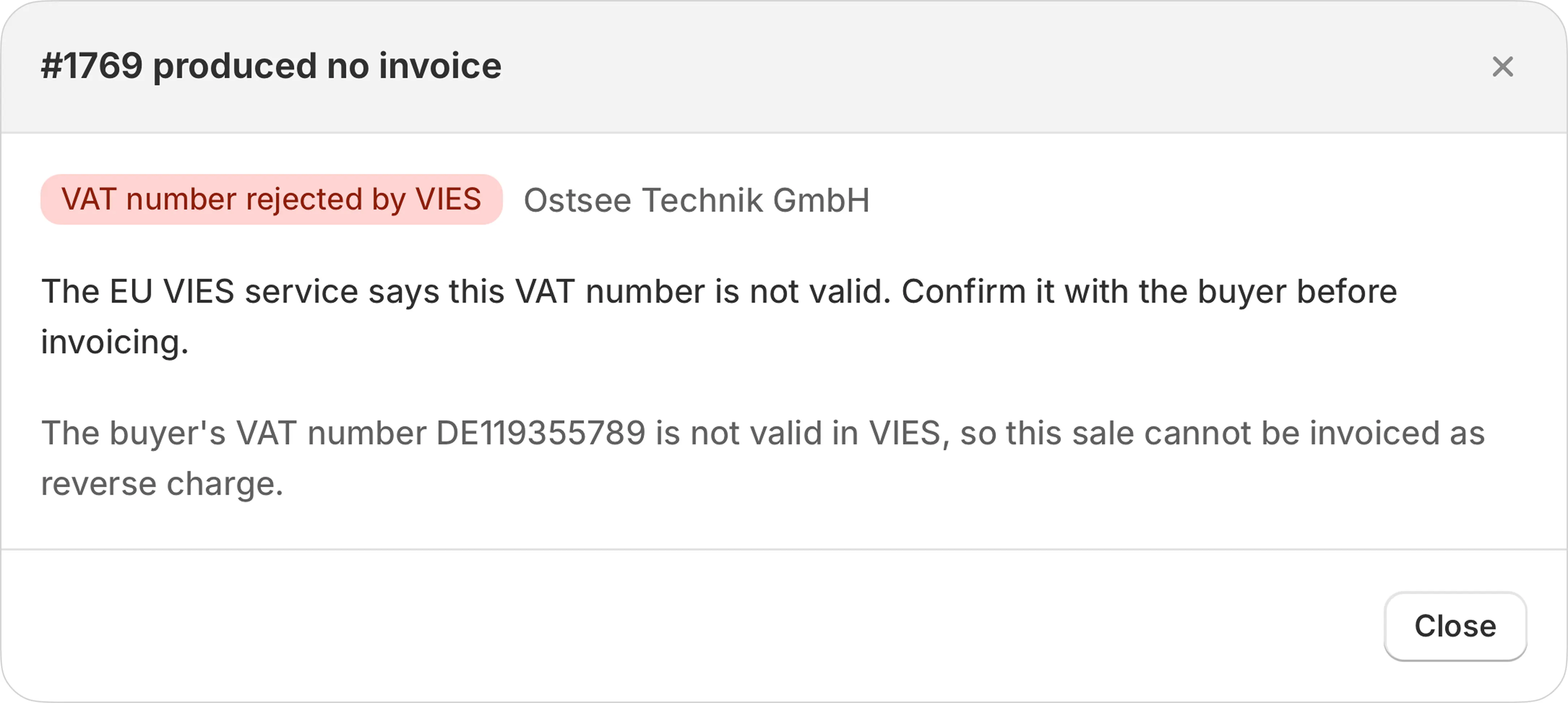
How to read a stopped row
Every stopped invoice carries two things, and they do different jobs. The code is machine vocabulary: it is what the inbox filters, counts and groups on, and it is deliberately not pleasant to read. The sentence names the field, setting or record to change. Neither replaces the other, so both are always shown.
Alongside those, the row shows what the engine actually observed on that one order, for example the specific VAT number that VIES rejected. Fix the cause, then send the invoice again from the same row.
Every reason, and what clears it
38 of them. This table is generated from the same strings the app shows you, so it cannot fall out of date with the product.
The shape of the order
Nothing wrong with your settings. This order is not something an invoice can be made from.
| Code | What it means, and what to do |
|---|---|
NO_LINESNo invoice lines | The order has nothing to invoice. Check the order in Shopify still has line items. |
NEGATIVE_LINENegative line | A line has a negative amount. A refund or correction is a credit note, which Zeppol does not issue automatically yet. |
NON_EUR_CURRENCYCurrency not EUR | This invoice is not in euros and does not state its VAT in euros, which EU law requires. Send this one to [email protected]. |
Who the buyer is
An e-invoice has to name the buyer as a legal entity, and address them. Most of these are one field on the customer record.
| Code | What it means, and what to do |
|---|---|
MISSING_BUYER_COUNTRYBuyer country missing | The buyer has no country, so the VAT treatment cannot be decided. Add the country to the billing address on the order. |
MISSING_BUYER_VATBuyer VAT number missing | A business buyer needs a VAT number on the invoice. Ask the buyer for it and add it to the customer record. |
INVALID_BUYER_VAT_FORMATBuyer VAT number malformed | The buyer's VAT number does not match the format its country uses. Correct it on the customer record. |
MISSING_BUYER_COMPANY_NAMEBuyer company name missing | An invoice must name the buyer as a legal entity. Add the company name to the customer or the billing address. |
VIES_INVALIDVAT number rejected by VIES | The EU VIES service says this VAT number is not valid. Confirm it with the buyer before invoicing. |
MISSING_PEPPOL_IDPeppol ID missing | No Peppol ID could be worked out for the buyer. Add the buyer's VAT number, or their Peppol ID if they gave one. |
The VAT
The half that decides whether a receiving system accepts the document. Zeppol refuses to send an invoice whose numbers do not add up.
| Code | What it means, and what to do |
|---|---|
REVERSE_CHARGE_VAT_CHARGEDVAT charged on a reverse-charge order | This is a cross-border B2B order, so VAT should not be charged. Correct the tax settings for this buyer, then re-check. |
REVERSE_CHARGE_VAT_UNVALIDATEDVAT number not confirmed yet | Reverse charge needs the buyer's VAT number confirmed by the EU VAT register (VIES) first, and it is not confirmed yet. Zeppol issues no invoice until it is. |
TOTALS_MISMATCHTotals do not add up | The line totals and the order total disagree. Check the order for a discount or refund Zeppol could not read. |
BALANCE_CHECK_FAILEDInternal balance check failed | Net plus VAT plus rounding did not equal the gross amount, so the invoice was not issued. Send this one to [email protected]. |
Who you are
Your own details, from Seller details. These block every invoice until they are filled in, so they usually appear once and never again.
| Code | What it means, and what to do |
|---|---|
MISSING_SELLER_NAMEYour legal name missing | Fill in your registered company name under Seller details. |
MISSING_SELLER_ADDRESSYour address missing | Fill in your street, postcode, city and country under Seller details. |
MISSING_SELLER_TAX_IDYour tax number missing | Fill in your VAT identification number or tax number under Seller details. |
MISSING_SELLER_CONTACTYour contact details missing | Fill in the contact email and phone number under Seller details. |
MISSING_SELLER_REGISTER_SCHEMERegister type missing | A Dutch invoice must say whether your register number is a KVK or an OIN number. Choose one under Seller details. |
Fields the document is missing
Required by law or by the buyer, and not derivable from the order.
| Code | What it means, and what to do |
|---|---|
MISSING_SUPPLY_DATESupply date missing | German law requires the date the goods or services were supplied. Zeppol takes it from fulfilment, so fulfil the order, then re-check. |
MISSING_BUYER_REFERENCEBuyer reference missing | This buyer requires a reference (often a purchase order number) on the invoice. Ask them for it and put it on the order. |
The official rule sets
The EN 16931 and German Schematron rules, run against the finished document before it is sent.
| Code | What it means, and what to do |
|---|---|
SCHEMATRON_FATALRejected by the invoice rules | At least one official EN 16931 or German rule refused this document. The failing rule ids are in the detail below. |
VALIDATION_INCOMPLETECould not be checked | The rule set could not be run, so this invoice is unvalidated rather than known-good. Nothing was sent. Try again later. |
Getting it out of the door
The document is fine. The route is not.
| Code | What it means, and what to do |
|---|---|
RECIPIENT_UNREACHABLEBuyer not reachable on Peppol | The buyer is not published on the Peppol network for this document type. Ask them for their Peppol ID, or send by email instead. |
NO_DELIVERY_CHANNELNo delivery channel enabled | Peppol and email delivery are both off for this shop, so the invoice has nowhere to go. Email [email protected] to switch email delivery back on. |
PLAN_LIMIT_REACHEDPlan limit reached | Your plan's documents are all used up, so this invoice was not sent. Choose a paid plan on Shopify, then send this invoice again. |
Reading the order from Shopify
Rare, and none of them are your fault. Both of these want an email to support.
| Code | What it means, and what to do |
|---|---|
LINE_ITEM_LIMIT_EXCEEDEDOrder too large to read in full | This order has more line items than Zeppol can read in one go. Invoicing part of it would understate the total, so nothing was issued. Send this one to [email protected]. |
ORDER_SCOPE_MISSINGZeppol lacks a permission | Shopify refused a field this invoice needs. Reinstall or reauthorise Zeppol so it can read the whole order. |
Not yet grouped
These codes exist in the app but are not placed in a section on this page. They are listed rather than hidden, because an undocumented block is worse than an untidy heading.
NON_EUR_VAT_DUE | Zeppol now states the VAT in euros at the ECB reference rate, so this order can be invoiced in its own currency. Press Try again to build it. |
NO_ECB_RATE | This order has VAT to pay in a currency the European Central Bank publishes no euro rate for. EU law requires that VAT in euros as well, and Zeppol states it only at the official rate. Orders where no VAT is due are invoiced in any currency. |
ECB_RATE_UNAVAILABLE | The European Central Bank's rate service did not answer, so the VAT in euros could not be stated yet. Zeppol tries again on its own; nothing is needed from you. |
MIXED_CURRENCY | Shopify reported amounts on this order in more than one currency, so Zeppol cannot state one invoice total. Nothing was issued. Send the order number to [email protected]. |
MISSING_BUYER_ADDRESS | A German invoice to a German buyer must state the buyer's postcode and city. Add them to the company location or the billing address of the order in Shopify. |
MIXED_SUPPLY_EXPORT | This sale to a buyer outside the EU mixes a service, which is outside EU VAT, with goods, shipping or a taxed line. An e-invoice cannot state those together, so nothing was issued. |
MISSING_SELLER_REGISTER_NUMBER | An invoice for a service outside EU VAT carries no VAT number, so it must identify you by your commercial register number. Fill it in under Seller details. |
MISSING_SELLER_PEPPOL_ID | Peppol addresses your invoices by your VAT number, so it has to match your country. Correct the VAT number or the country under Seller details. |
NO_INVOICE_TO_CREDIT | This order was refunded but was never invoiced, so there is nothing to credit. If an invoice was owed, issue that first and the refund can be credited against it. |
MODE_MISMATCH | This invoice was numbered before the shop changed between test and live. A document from one mode is never sent through the other network, so it stays as it is. If the buyer still needs an invoice for this order, send the order number to [email protected]. |
TEST_MODE_NO_RECIPIENT | In test mode Zeppol sends invoice emails to your invoice email address in Seller details, never to your buyer, and none is set. Add one, then press Try again. |
Skipped is not stopped
Some orders produce no invoice because none is owed. Those are marked as skipped, and nothing is waiting on you. They are kept separate from blocks on purpose: “Zeppol decided not to invoice this” and “Zeppol tried and could not” are opposite facts, and they used to look identical.
| Code | Why no invoice was issued |
|---|---|
ELIGIBLEIn scope | This order is one Zeppol invoices. If no invoice is shown here yet, it has not been built. |
B2C_OUT_OF_SCOPEConsumer sale | No company or VAT number on this order, so no e-invoice is owed. Zeppol invoices business buyers. |
NON_EU_EXPORTOutside the EU | The buyer is outside the EU VAT area, which is outside Peppol's scope, so no e-invoice was issued. Check the export treatment on your own paperwork. |
REFUND_CREDIT_NOTERefund | This order was refunded. A refund is a credit note, which Zeppol does not issue automatically yet, so nothing went out for it. |
Why nothing is retried automatically
When a send to the Access Point times out or returns an error, Zeppol parks the invoice for review instead of trying again. The reason is specific rather than cautious: the Access Point's send endpoint accepts no idempotency key and mints the document id on its own side, so a retry after a timeout can put a second legally valid copy of the same invoice onto the Peppol network with no way to tell which one arrived.
A parked invoice is reconciled by its invoice number, which is the one identifier both sides share. This is the single most important reason Zeppol would rather stop than guess.
Something missing here?
Write to me. Anything asked more than once ends up on this page.